
You have put an event on sale, the first orders are coming in, and a simple question follows: where is that money, and when can you use it? How do event organisers get paid is one of the most common questions from people running their first comedy night, school concert or small festival. The answer depends less on the ticket price and more on how your ticketing platform handles payments.
This guide explains where ticket money goes, the two main payout models, why timing matters for your cash flow, and how to set things up properly. If you are new to selling online, the complete guide to selling tickets online covers the wider picture.
How do event organisers get paid? The short answer
When a buyer pays for a ticket by card, a payment processor takes the payment. The money then sits in an account balance until it is paid out to a bank account on a schedule.
The key question is whose account that is.
- The platform's account: the ticketing company collects the money and pays you later, on its own timetable.
- Your own account: the payment is taken on your own payment account, such as Stripe, and reaches your bank on your payout schedule.
This matters because small organisers spend money long before the doors open. Venue deposits, performer payments and printing are often due weeks ahead. Knowing when you get paid for ticket sales tells you whether ticket income can cover those costs, or whether you need to find the money elsewhere first.
The two main payout models ticketing platforms use
Model 1: the platform holds the money
Here the platform collects every ticket payment in its own account. You see sales in a dashboard, but the money is not yours to move yet. The platform pays you out later. With some platforms, that means after the event has taken place.
The reasoning is that if an event is cancelled, the platform still has the money to refund buyers. That protects buyers, but it can leave you short of cash in the weeks when your bills arrive.
Model 2: payments go into your own account
Here you connect your own payment account to the ticketing platform. When a buyer pays, the payment is taken on your account. The money follows your account's normal payout schedule, so it can reach your bank during the sales period rather than after the show.
The trade-off is responsibility. Because the money is yours from the start, refunds and card disputes are also yours to handle.
Side by side
| Platform holds the money | Your own payment account | |
|---|---|---|
| Who holds the funds | The ticketing platform | You |
| When you can access them | On the platform's schedule, sometimes after the event | On your own payout schedule, during sales |
| Who sees the balance | The platform, you see a sales report | You, in your own payment dashboard |
| Who handles refunds | Often the platform, from funds it holds | You, from your balance |
| Who handles card disputes | Usually the platform | You, through your payment account |
If you are comparing several tools, this comparison of Eventbrite alternatives looks at how different platforms approach sales and seating.
Questions to ask any platform before you sign up
- Whose account does the buyer's payment land in?
- When does the money reach your bank: during sales, or only after the event?
- Can you see your balance and upcoming payouts yourself?
- Who issues refunds, and how does the buyer find out?
- What happens to the money if the event is cancelled or postponed?
- Who deals with card disputes?
If a platform cannot answer these clearly, treat that as a warning sign.
Why cash flow before show night matters
Most events cost money long before they make any. Typical upfront costs include:
- Venue hire deposits
- Performer, artist or speaker payments
- Marketing, such as social ads and posters
- Printing for programmes, wristbands or signage
- Staff, sound and lighting crew
- Equipment hire and insurance
If ticket money is held until after the event, every one of these has to be paid from your own savings, a sponsor or credit. For a one-off event that might be manageable. For a venue running shows every week, or a promoter booking a full season, money tied up for weeks at a time adds up quickly.
A worked example: a 200-seat comedy night
Picture a promoter running a 200-seat comedy night on a Friday in late November. Tickets go on sale in early September.
- Early September: the venue wants its deposit to confirm the date.
- Late September: the headliner's agent asks for part of the booking payment.
- October: the promoter spends on social ads and posters to push sales.
- Early November: the support acts and the sound engineer are confirmed and booked.
- Show night: the remaining balance to the venue and acts is due.
Suppose 120 tickets sell in the first month.
With the platform holding the money until after the event, none of those 120 tickets helps pay the September deposit or the October ads. The promoter covers everything personally and waits until December to be paid back.
With payments going into the promoter's own account, money from those early sales reaches the bank in September and October. The deposit and the ads can come from ticket income. The promoter still needs to keep some aside for possible refunds, but planning becomes far less stressful.
Using Stripe for event tickets: what organisers need to know
What Stripe is, in plain English
Stripe is a payment company. It lets businesses accept card payments online and pays the money into their bank account. Many ticketing tools use it because it handles the card processing and security, and it lets each organiser have their own account and dashboard.
Using Stripe for event tickets means buyers pay by card at checkout, and the payment is recorded in your Stripe account rather than someone else's.
What you need to open an account
Stripe will ask for details about you and your organisation. Exact requirements vary, but expect to provide:
- Your name, address and date of birth
- Business details if you operate as a company, or personal details if you are a sole trader
- A description of what you sell
- The bank account you want payouts sent to
Stripe may ask for identity documents to verify your account. Do this well before tickets go on sale, not the night before.
How Stripe payout schedules work
Payouts follow the schedule set in your Stripe account. You can usually choose how often money is sent to your bank, such as daily, weekly or monthly. The very first payout on a new account often takes longer than later ones while Stripe completes its checks. Stripe's own guide to payouts explains the options and timings in detail.
Where to check your balance
In your Stripe dashboard you can see your current balance, money that is on its way to your bank, and the dates of upcoming payouts. It is worth looking at this weekly during your sales period, so you always know what has arrived and what is still to come.
How it works in Ticketseat: connect your own Stripe account
Ticketseat follows the second model. During setup in the Ticketseat admin, you connect your own Stripe account. From then on, every ticket payment is taken on your Stripe account. The money is not held by a middleman.
Payouts to your bank follow your own Stripe payout schedule. If you have set Stripe to pay out weekly, ticket money arrives weekly, whether your event is next Friday or three months away. That answers the question of when event organisers get paid in the simplest way: on the schedule you chose.
Alongside your Stripe balance, you can follow sales in the Ticketseat admin. The sales dashboard and analytics show revenue, orders, average order and store visits for the last 7 days, with a revenue trend chart.
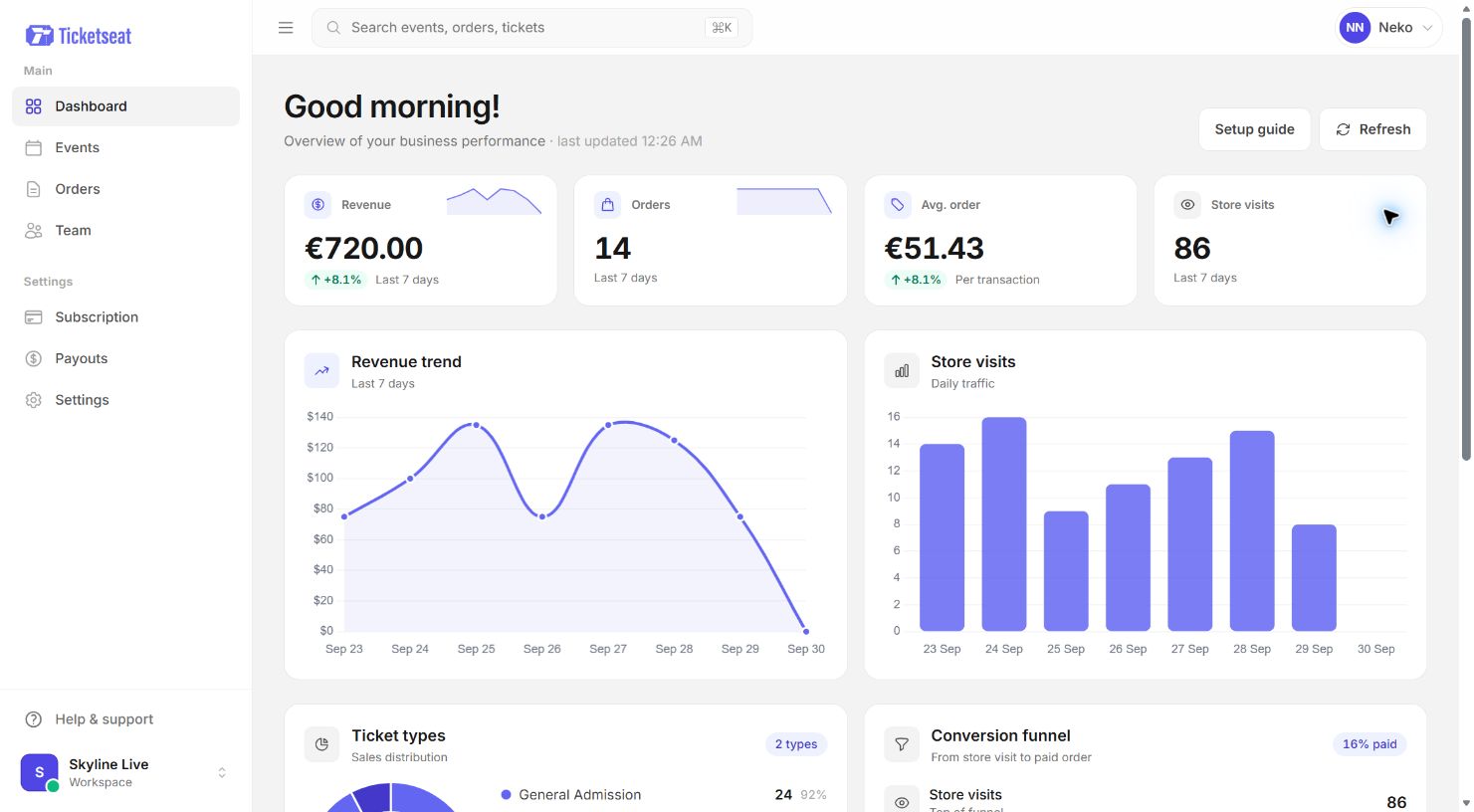
A useful habit: check revenue in the admin and compare it with the payouts shown in Stripe. If both line up with your cost plan, you know exactly where you stand.
Refunds, cancellations and disputes when the money is in your account
Plan for refunds from your balance
When payments sit in your own account, refunds generally come from your balance. If you have already moved all your ticket money out to pay suppliers, a wave of refunds can catch you short.
A simple rule: keep part of your ticket revenue aside until the event has happened. How much depends on your refund policy and how likely a postponement is. An outdoor summer event carries more weather risk than an indoor theatre show, for example.
Refunding an order in Ticketseat
In Ticketseat, you refund an order from the admin, and the buyer gets a refund email. That keeps the process quick on your side and reassures the buyer that their money is on the way.
Reducing card disputes
A dispute happens when a buyer asks their bank to reverse a payment. Some are genuine fraud, many are confusion. You can prevent a lot of them:
- Describe the event clearly: date, start time, venue, age limits and what is included.
- Use a recognisable name on card statements: buyers who do not recognise a charge are more likely to dispute it. Check how your business name appears in your Stripe settings.
- Keep order records: buyer details, ticket emails and scan records help if you need to respond to a dispute.
- Make it easy to contact you: a buyer who can reach you quickly is less likely to go to their bank.
For help writing a clear policy, read the guide to ticket refunds and exchanges.
Checklist: set up ticket payments the right way
Work through this before your next event goes on sale.
- Decide which payout model suits your cash flow. If you pay costs upfront, payments into your own account will usually suit you better.
- Open and verify your Stripe account early. Allow time for identity checks so nothing delays your on-sale date.
- Check your payout schedule and bank details. Confirm how often payouts happen and that the bank account is correct.
- Run a test order and a test refund. Buy a ticket yourself, then refund it. Check the money moves and the buyer emails arrive as expected.
- Write and publish a clear refund policy. Put it on the event page and in your ticket emails.
- Set aside a refund reserve. Decide how much ticket income you will hold back until after the event.
- Review revenue weekly against upcoming costs. Compare sales, Stripe payouts and the bills due in the coming weeks.
How Ticketseat helps
Ticketseat lets you accept card payments for event tickets through your own Stripe account, which you connect during setup in the admin. Ticket payments land in your account, payouts follow your own Stripe schedule, and you can refund an order from the admin with the buyer receiving a refund email. It is free to start, so you can set up an event and run a test order before committing to anything.
Start free at ticketseat.io and connect your Stripe account before your next event goes on sale.
Frequently asked questions
When do event organisers get paid for ticket sales?
It depends on whose account the payment lands in. If the ticketing platform collects the money, you are paid on its schedule, which is sometimes after the event. If payments are taken on your own payment account, such as Stripe, the money reaches your bank on that account's payout schedule during the sales period.
Do I need a Stripe account to sell event tickets?
Not with every platform, as some collect payments in their own account and pay you later. Platforms that take payments on your own account usually ask you to connect a Stripe account during setup. Opening one takes some business or personal details and the bank account you want paid into.
Can I get paid for ticket sales before my event happens?
Yes, if payments go into your own payment account. The money then follows your account's normal payout schedule, so it can reach your bank weeks before show night. If a platform holds the money until after the event, you will need other funds to cover early costs.
Who pays for refunds if an event is cancelled?
If ticket money is in your own account, refunds come from your balance. That is why it helps to keep part of your ticket revenue aside until the event has happened. Check how any platform handles cancellations before you sign up.
Is it better for ticket money to go into my own account or the platform's?
For most small organisers, their own account gives more control. You can see your balance, set your payout schedule and use ticket money to cover costs before the event. The trade-off is that you are responsible for refunds and disputes, so plan for them.
Ticketseat Team
Sharing insights about event ticketing, platform updates, and industry best practices.
Related Articles
View all
How to Track Ticket Sales (and Know When to Act)
A practical guide for organisers: the five numbers worth watching, a simple pace check against your target, a 10-minute weekly routine and what to do when sales are slow or fast.
How to Email Event Attendees: Updates, Reminders and Templates
A practical guide to the emails you send after the sale: event day information, messages to specific ticket types, and change or cancellation notices, with copy-ready templates and a pre-send checklist.
Mobile Tickets for Events: How QR Code E-Tickets Work
A plain-English walk through the life of a mobile ticket: from checkout and email to the QR code, the PDF backup and the scan at the door, with fixes for lost emails, flat batteries and shared screenshots.
Compare Ticketseat
See how Ticketseat stacks up against other ticketing platforms.
Ready to Transform Your Event Ticketing?
Create your event page, sell tickets with seat maps, and scan guests in at the door. Free to start.