
Turn any phone into a ticket scanner
Send each door a link or show its QR code. The scanner opens in the phone's browser, already signed in, with no app to install and no password. Every scan answers in colour and shows the seat in large type, so your staff know at a glance who goes where.
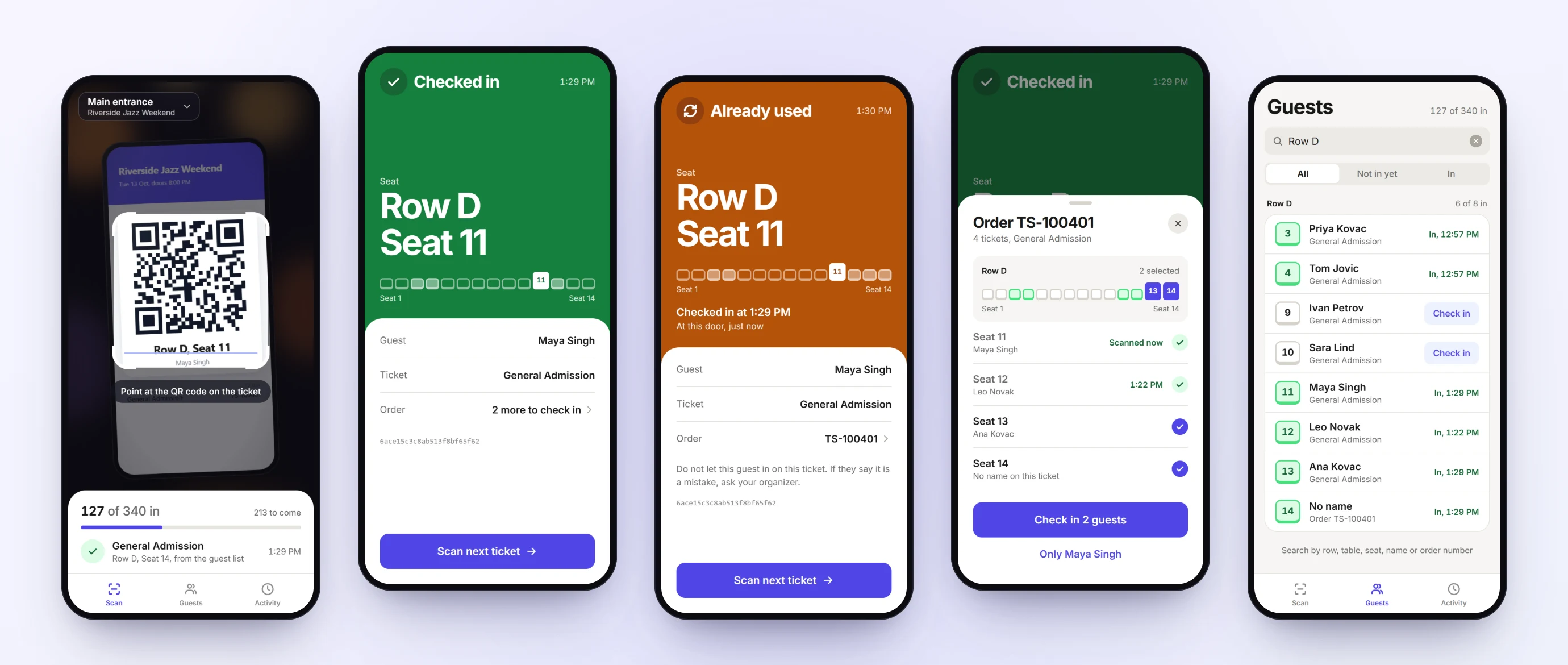
One link per door, nothing to install
Name a door in your event settings and you get a link and a QR code for it. Staff open it on their own phone and start scanning. You see which phones are signed in, and you can sign one out or reset the link at any time.
The answer is a colour and a seat
Green lets the guest in. Amber means the ticket was already used, with the time and the door. Red means it is not accepted, with the reason. The row, table or standing area is in large type, next to the guest's name and what the ticket includes.
Check in the whole group at once
When a ticket is part of a bigger order, open the order from the result, tick the guests who have arrived and check them in together.
Find a guest without their ticket
Search the guest list by name, seat, row, table or order number and check the guest in from there. A live count shows how many guests are in and how many are still to come.
Day passes that work every day
A multi-day pass lets its holder in once on each event day, up to the number of days on the pass. The scanner shows which days are used.
A door for each ticket type
Limit a door to certain ticket types, such as a VIP entrance. A ticket for another door is refused with a clear message.
How it works
Add a door
In your event settings, give the scanner a name such as Main entrance.
Share the link
Show the QR code or send the link. The phone signs in by itself and stays signed in for the event.
Scan tickets
Point the camera at a ticket. The result shows who the guest is and where they sit.
See how Ticketseat compares
Weighing platforms? Read the honest, side-by-side comparisons.
Related: Reserved & assigned seating · Pricing & plans
Open your doors with a link.
Add a scanner to your event, share its link, and check guests in from any phone.